

%load_ext autoreload
%autoreload 2
%matplotlib inline

import matplotlib.pyplot as plt
import matplotlib.animation as animation
import torch
import caustics
from caustics import Module, forward
from IPython.display import HTML
Building a Microlensing Simulator#
This documentation provides an overview of how to build your own Simulator. In this tutorial, we will use the ray tracing tools within the caustics library applied to microlensing. We will cover:
Creating a custom microlensing
SimulatorSetting up the parameters for our custom sim
Running batched, dynamic simulations and visualizing the results
By the end of this guide, you will hopefully feel empowered to create your own custom Simulator for your use case!
# Microlensing Physical Parameters
Rein = 0.3  # Einstein radius in arcsec

# Microlensing Model Parameters
t0 = 0.2  # time at peak magnification
u0 = 0.5  # minimum impact parameter (u(t=t_0)) in units of th_ein
tE = 0.05  # Einstein timescale
rho = 2.5  # source size in units of lens Einstein radii

gamma = 0.6  # linear limb darkening coefficient
Setting up the Lens, Source, and Cosmology environment#
We will be using a Point lens model and a StarSource light source model provided by caustics. We also must define a cosmology environment, which, caustics uses to calculate cosmological evolution at large distances. Here, we define a FlatLambdaCDM cosmology. But since we only typically care about redshift \(z\approx0\) for microlensing, the cosmology will not actually matter.
cosmology = caustics.FlatLambdaCDM()
point_lens = caustics.Point(
    cosmology=cosmology, name="lens", y0=-u0 * Rein, Rein=Rein, z_l=0.0, z_s=0.0
)
src = caustics.StarSource(
    name="source", x0=0.0, y0=0.0, theta_s=Rein * rho, Ie=5.0, gamma=gamma
)
# Define the pixel grid for imaging
n_pix = 100
res = 0.05
upsample_factor = 10
theta_x, theta_y = caustics.utils.meshgrid(
    res / upsample_factor,
    upsample_factor * n_pix,
    dtype=torch.float32,
)
Building our Simulator#
Here we define a Microlens class that extends caustics.Simulator. Generically, the child class is where you define all the methods necessary to run your simulation, which is done in the forward method. This allows us to run the simulator by passing a single argument, the params dictionary, and the caustics backend handles the rest.
In our case, we use our simulator to calculate the magnification of a source at a given position, as well as the lensed image(s) (by definition, multiple images are unresolvable in microlenisng).
class Microlens(Module):

    def __init__(self, lens, src, name: str = "sim"):
        super().__init__(name)
        self.lens = lens
        self.src = src
        self.theta_x = theta_x
        self.theta_y = theta_y

    @forward
    def sample(self):
        # Compute the observed positions of the source
        beta_x, beta_y = self.lens.raytrace(self.theta_x, self.theta_y)
        # Compute the brightness of the source at the observed positions (the image)
        brightness = self.src.brightness(beta_x, beta_y)
        # Compute the baseline (unlensed) brightness of the source
        baseline_brightness = self.src.brightness(theta_x, theta_y)
        # Return the lensed image [n_pix x n_pix], and magnification
        return brightness, brightness.mean() / baseline_brightness.mean()
Now we can visualize the structure of our simulator
sim = Microlens(point_lens, src)

sim.graphviz()
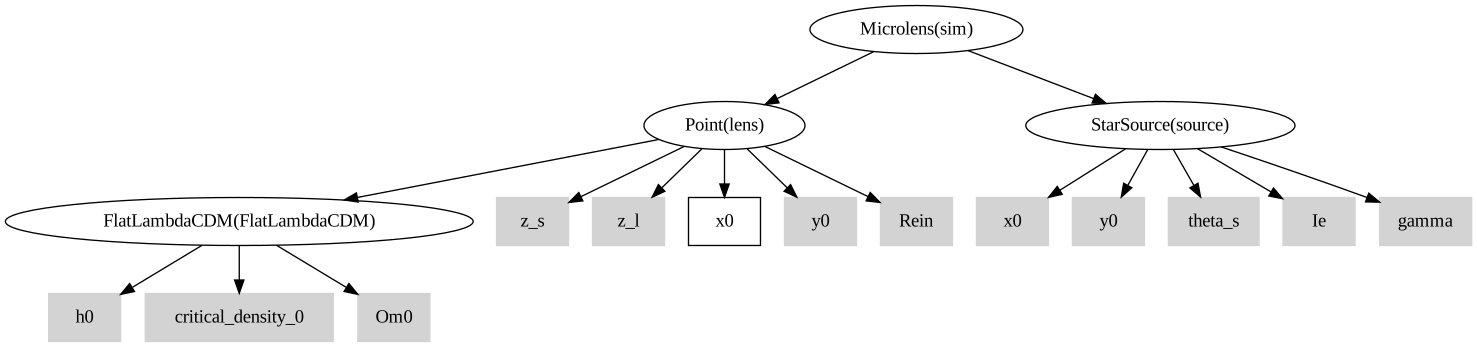
Now we can set up the parameters for our simulation. We can look at the order of the parameters expected by our simulator by looking at x_order. Here, the lens x position is the only dynamic variable.
print(sim)
sim|Microlens
    lens|Point
        FlatLambdaCDM|FlatLambdaCDM
            h0|static: 0.677
            critical_density_0|static: 1.27e+11
            Om0|static: 0.31
        z_s|static: 0
        z_l|static: 0
        x0|dynamic
        y0|static: -0.15
        Rein|static: 0.3
    source|StarSource
        x0|static: 0
        y0|static: 0
        theta_s|static: 0.75
        Ie|static: 5
        gamma|static: 0.6
B = 64  # Batch size
ts = torch.linspace(-6 * tE + t0, 6 * tE + t0, B).view(-1, 1)  # Create time grid

# Calculate source position at each time in arcsec
x0s = (ts - t0) / (tE) * Rein  # Shape is [B, 1]
Running the simulation and visualzing the output#
Running a batched simulation over different parameters (in our case, these correspond to the lens motion in discrete time-steps by construction) is now as easy as using vmap on our simulator. We can then visualize the total output
images, magnifications = torch.vmap(sim.sample)(x0s)